
Short-form,
that's enough for today
Ever said “just one more” and lost an hour? Pochi is a hamster friend who counts the Shorts, Reels and TikToks you swipe through with you, and lets you know when it's time to call it a day.
- Free
- No ads
- No in-app purchases
- Works as a guest

See your usual habits first,
then cut back on your own terms
Instead of a number someone else picked, you start from your own average over a few normal days.
-
First, just watch as usual
For the first few days (1–14 days, 7 recommended), Pochi only counts. You'll see how many YouTube Shorts, Instagram Reels and TikToks you swipe through each day.
Even while observing, you can block right away with the Block shorts switch on the home screen. -
Set a limit from your average
Choose Cut a little, Cut in half, Cut a lot, Barely watch, or Quit entirely, or set your own number from 0 to 300.
Usually 147 a day → cut in half and it's 75 a day -
Pick a mode for each app
For Shorts, Reels and TikTok, pick Count, Switch or Pause for each one and mix them as you like. Turn on gradual reduction and your limit drops by about 10% each week you stick to it.
When you use up your limit, Pochi takes you out of the short-form screen and suggests something small instead, like reading a book for 10 minutes.
Count Only up to your daily number
Watch only as many as you set, like 75 a day. The home screen shows how many you have left.
Switch Turn it on and you can't watch at all
Even on days you leave it off, your streak continues as long as you stay within your daily limit, and Pochi warns you before it breaks.
Pause A moment to think, every time
It doesn't block. Each time you open one, it shows a quote for 5 seconds to give you a chance to think again.
As the good days add up,
you can see it
-
Streaks and sunflowers
Keep your daily limit and your streak keeps going. Your pot grows from a sprout to a bud to a sunflower, and when you reach 100 days a golden sunflower blooms. The sunflower seeds you collect on each day you hold back can be spent in the shop.

Sprout 
Bud 
Sunflower -
Schedules
At times you set, like bedtime (10 PM–7 AM), class hours or exam weeks, Pochi automatically blocks more strictly. A weekly table shows at a glance when and how much you can watch.
-
Titles and badges
Earn titles by reaching milestones like streaks, time reclaimed and cheering on friends. Pick one to wear on your profile and it shows on the leaderboard too.
-
Friends and weekly rankings
Invite friends with an invite link or code, and compete on time reclaimed this week. You can send a cheer once a day. You decide whether you're visible.
-
This week's report card
Turn your time reclaimed and streak into a card image and share it. The image is made on your phone and sent only to the app you choose.
-
Blocks small windows too
If you pop short-form into a small window (PIP) while blocking is on, Pochi pauses it.
-
All watched? Try something else
When you use up your limit, Pochi suggests something small, like 1 minute of stretching or 5 deep breaths, with a timer. Finish it and you get seeds.
-
Dark theme
A deep brown, like roasted sunflower seeds, that's easy on the eyes at night. It follows your device setting.
More features
- Weekly report · Every Monday morning, see last week's results and your friend rankings.
- Home screen widget · See how many you have left and your streak at a glance.
- History · See your counts for the last 7 and 30 days, the split by app, and time reclaimed, all in one place.
- Sign-in and backup · Sign in with Google, Kakao or Naver and your progress carries over even if you switch phones.
- Getting-started guide · Even first-timers can follow along step by step.
- Report a problem · If counting seems off or something looks wrong, tell us right from the app.
Here's what Pochi looks like
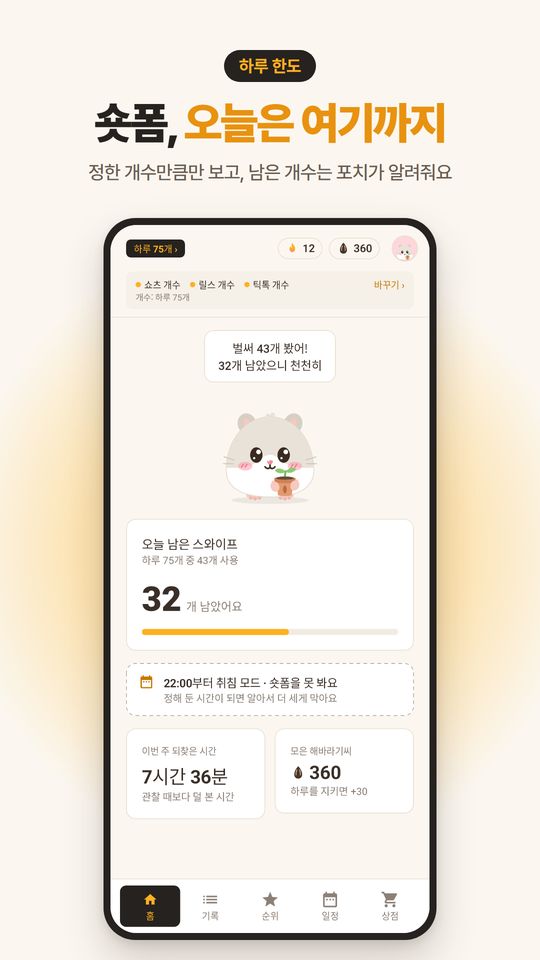
Daily limit home
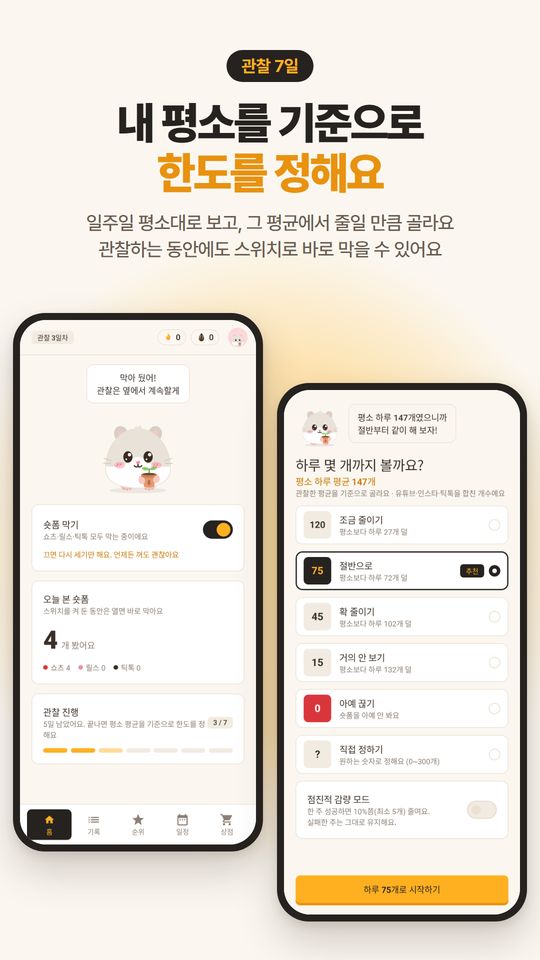
Setting a limit from your average
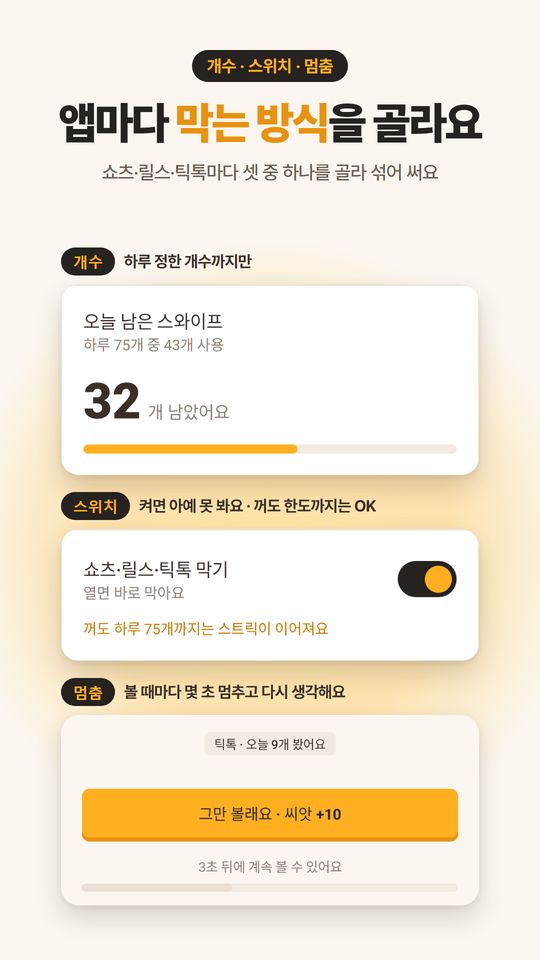
Count · Switch · Pause
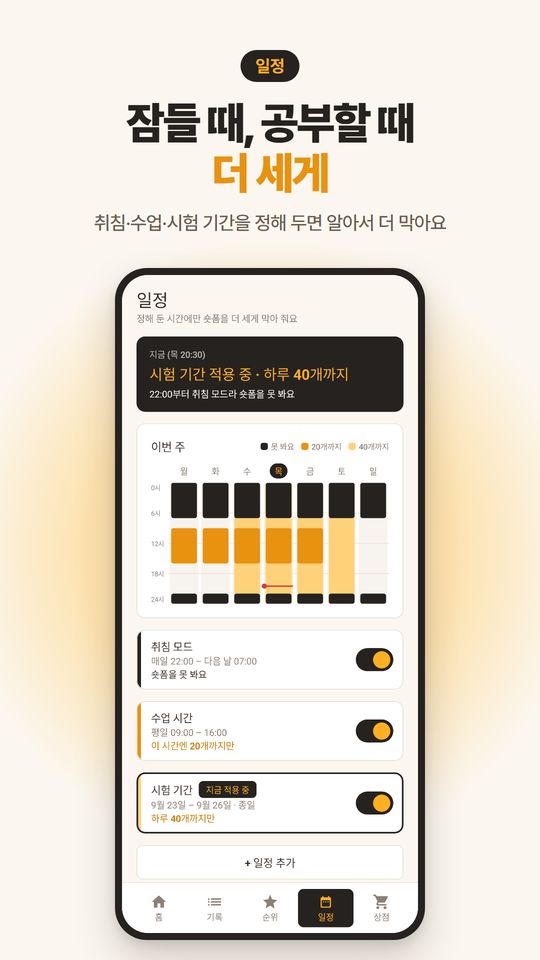
Schedules
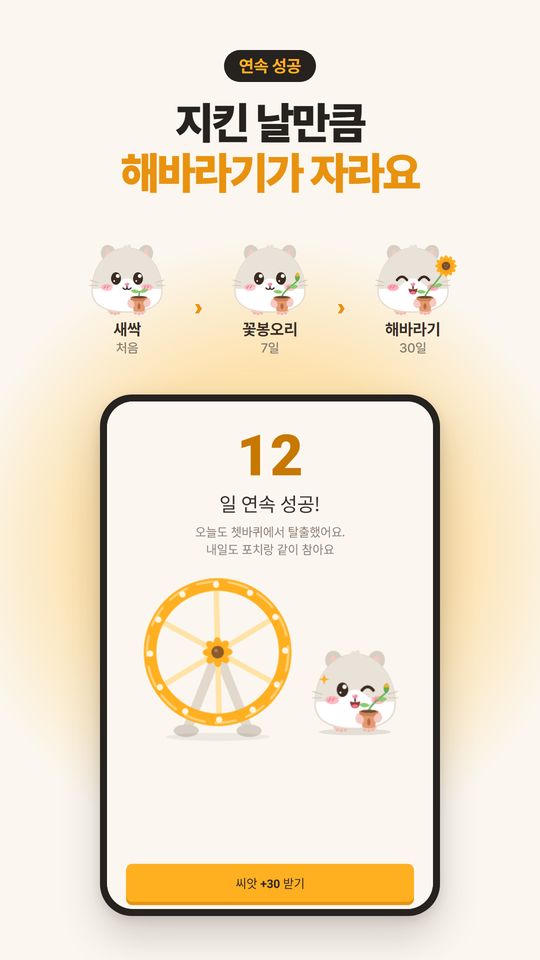
Streaks and sunflowers
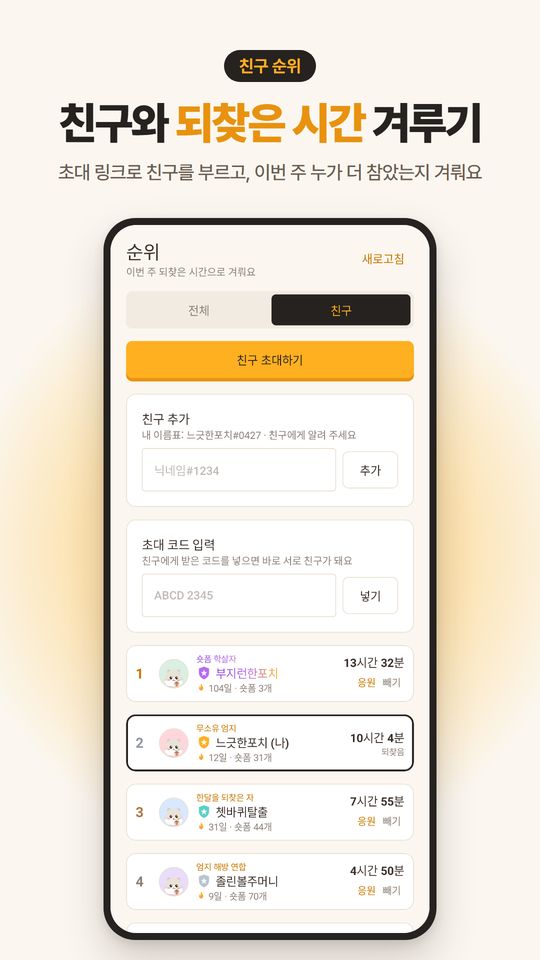
Friends and rankings
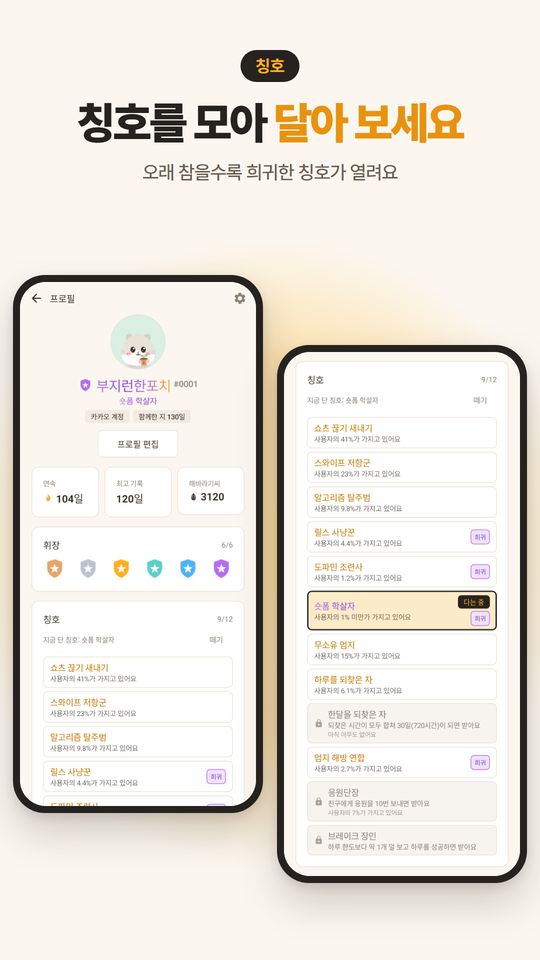
Titles
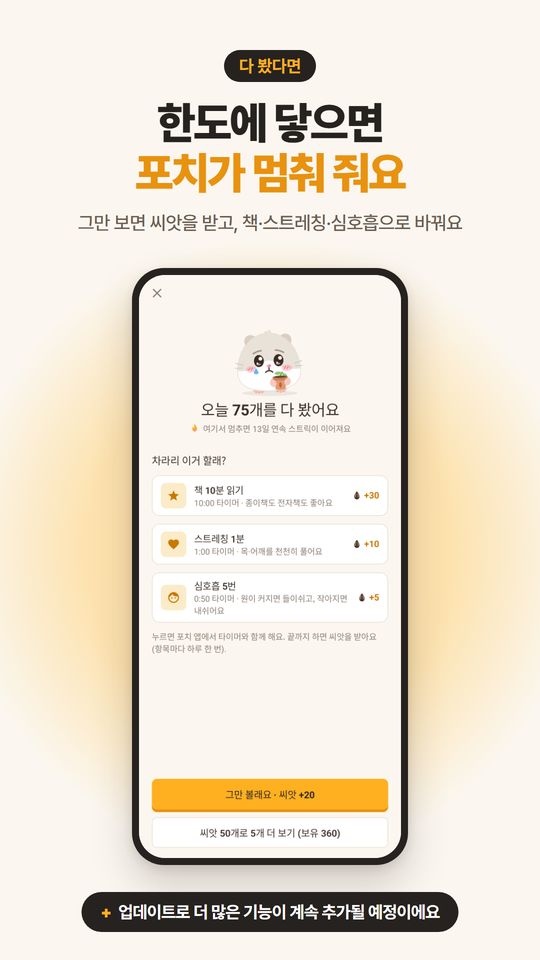
When you hit your limit


Swipe sideways to see more. Screenshots are from the Korean version, and the numbers and names shown are examples.
Counting stays on your phone,
only numbers leave it
Pochi uses Android's Accessibility Service to count and block short-form videos. So first, here's what it looks at and what it doesn't.
Only in three apps, only on your phone
It works only in YouTube, Instagram and TikTok. On your phone, it checks whether the current screen is short-form, whether you swiped to the next video, and whether there's an ad label.
Screen content is never stored or sent
Video content, comments, messages and anything you type are never stored or sent to a server. It doesn't look at screens outside those three apps.
Only number records go to the server
Only numbers, like daily counts, limits and whether you kept them, are sent for backup and rankings. You can delete your account right in the app.
Questions you might have
Why does it need the accessibility permission?
To count short-form videos and take you out of the short-form screen when you hit your limit, Pochi needs Android's Accessibility Service.
- What it checks: whether the current screen is YouTube Shorts, Instagram Reels or TikTok, whether you swiped to the next video, whether there's an ad label, and whether short-form is open in a small window (PIP)
- What it doesn't look at: video content, comments, messages, anything you type, or screens outside those three apps
- What goes to the server: number records like daily counts, limits and whether you kept them
You can turn the permission off in your device settings at any time.
What happens if I open it in a small window (PIP)?
If you pop short-form into a small window (PIP) while blocking is on, Pochi pauses it. If it doesn't stop, Pochi opens that app full-size again.
How do I delete my data and account?
You can delete it right away from Profile → Delete account in the app. Your profile, records, backup and friend data on the server are all deleted immediately, and you can choose whether to also delete the records on this phone.
If you can't use the app, email us at [email protected]. We'll delete it within 7 days after confirming it's you. See the account deletion guide for details.
Can I use it without signing in?
Yes, you can use it as a guest. If you sign in with Google, Kakao or Naver, your records are backed up and carry over even if you switch phones.
Why is it called Pochi?
Pochi comes from the English word pouch, like a hamster's cheek pouches. The idea is to tuck away, bit by bit, the time you'd otherwise let slip away on short-form.
Does it cost anything?
It's free. There are no ads and no in-app purchases. Sunflower seeds can only be earned by holding back, and they're never sold for money.
Documents
Pochi is not affiliated with or endorsed by YouTube, Instagram or TikTok. Each name is a trademark of its respective company.